Showing posts with label Blogging Tricks. Show all posts

Wednesday, 7 November 2012

Earn Money Online in Different Ways

There are many ways to make online money. If you search the web to know different ways to earn, you will find a lot of websites telling 101 easy and free ways. I am writing this article not to tell the easiest but some effective and efficient ways to earn. Before starting I concede to readers that I don't know any way that could make one rich over a night. Rather I do believe, to become hero from zero one needs to work hard with full of energy, patience and enthusiasm. Let's have a bird view of this post. Here I have written about PPC, Affiliate Program, Freelancing very shortly.

On each making money way , I have tried to focus on the following questions:


1)how much can be earned?

2)how to start to earn?

3)time to spend each day? etc...

1)PPC Program: Pay Per Click(PPC) is an advertising program in which advertisers pay a fixed amount every time when one of the ads is clicked. You will find out some websites those give free ads to place it on your blog or website. Google Adsense, Chitika and Bidvertiser are the leading websites among them. Cost Per Click (CPC) amount varies from one to another. Usually Adsense or Chitika pay $0.11 for each click. Sometimes Adsense pays $10 for per click. CPC or CPM depends on many related issues which are not concerned in this post. Anyway, if you get thousands of visitors for your site than this way may help you to earn online hundreds of money each month.

2)Affiliate Program: Affiliate Marketing is a program in which business pay a fixed amount or a percentage for each visitor or customer bought an item of their products or you refer a new user/customer to sign up on their websites. For example Amazon offers affiliate program and it's referral rate is 4%. If visitor buys a product of $100 from your referral link, Amazon will pay you $4. Chitika rewards 10% of what of what your  referred publisher earns and pay $25 when your advertiser referral spends $100 for add campaign. To earn from affiliating program you need a blog or website, then find out the websites which offers affiliate program and before starting it I recommend you to read their program terms and conditions.  

3)Freelancing: Sell your expertise on marketplace. This is the fastest way to make money online without investment. Elance.com , vworker.com are websites that match buyers and sellers of internet provided services. Normally buyers offer projects on different fields such as computer programming, website design, graphic design, writing, copywriting, consulting, translating etc. You can earn $100 each day or even more from home.Since the projects are open for all you have to bid with proposal explaining the way to solve the problem.

List of popular networks:

How to put Adsense code in middle of blogger post

Normally each visitor visits your blog to read post. So if you put adsense in the middle or anywhere of post, ads can get clicked more frequently. It will  help to earn more $$.

To put adsense code in the blog post, it is better parse the code first.So parse it using AdParser.

After parsing,your ad code should look like this.

Log in to your dashboard--> layout- -> Edit HTML
Check on "Expand Widget Templates"

Now find out the following tag:-
<data:post.body/>
Now replace above code with below code.

<div expr:id='"aim1" + data:post.id'></div>

       <div style="clear:both; margin:10px 0">

<!-- Your AdSense code here -->

</div>

<div expr:id='"aim2" + data:post.id'>

<data:post.body/>

</div>

<script type="text/javascript">

var obj0=document.getElementById("aim1<data:post.id/>");

var obj1=document.getElementById("aim2<data:post.id/>");

var s=obj1.innerHTML;

var r=s.search(/x3C!-- adsense --x3E/igm);

if(r>0) {obj0.innerHTML=s.substr(0,r);obj1.innerHTML=s.substr(r+16);}

</script>

Now save your template.
Now in every blog post ,Put this special code : <!-- adsense --> in the place where you want to show your adsense ads.

Submit to Popular Search Engines To Boost Blog Traffic | SEO Tips

Search Engines are the source of huge amount of free traffic. Millions of People use search engine such as Google, Yahoo, MSN etc each day. To find your blog in search engines you have to submit your blog sitemaps. It does not assure that you will get a lot traffic from submission day.

Here SEO (Search Engine Optimization) is one of the great concerns to index your blog at first page of search result. Search this blog for different SEO tips to optimize your site for popular search engines. Before optimization, first and foremost duty is to submit your blog/site to search engines.

Follow the list below to submit your blog’s URL to some popular search Engines:
1. Submit to Google Search Engine. (Gmail Login required)

2. Submit Sitemaps to Yahoo.

3. Blog Submission to MSN Search Engine

4.Exalead Search Engine

5.Submit Blog Sitemaps on Ask.com Search Engine

6.Technorati (requires to sign up to claim a blog)

7. Submit to Open Directory

I hope you enjoy it. Now share it with your friends to help them.

How to add Different Meta tags to Different Blogger Posts | SEO Tips

If you are beginner in SEO and does not have any idea of Meta Tag, just read this post first about Meta Tag.It is very good for SEO (Search Engine Optimisation). Actually, why we are adding meta tags is to tell search engines what that page is all about... but, using same meta tags to all of your blog posts lessens the search engine rankings and traffic little bit.


But, if you add different unique meta tags to different Blog posts, it makes the search engines to know more about your individual blog posts and make them crawl and index your pages better and it also improves your Search engine rankings for sure ;)
How to insert Different Meta tags to Different Blogger Posts

1. Sign in to Blogger dashboard » Layout » Edit html and find out the following lines:

<b:include data='blog' name='all-head-content'/>


and add this code just below that line

<b:if cond='data:blog.url == "http://makeblogpopular.blogspot.com/"'>
<meta content='DESCRIPTION' name='description'/>
<meta content='KEYWORDS' name='keywords'/> </b:if>


We now added meta tags to the homepage. Next, you want to add meta description for another post, for example : http://makeblogpopular.blogspot.com/2009/03/how-to-add-meta-tag-to-blogger-blog-seo.html
Now, what you have to do is pasting the above three lines below the present code and changing the link,description and keywords.
So, the final code now looks something like

<b:include data='blog' name='all-head-content'/>
<b:if cond='data:blog.url == "http://inetincomeguide.blogspot.com/"'>
<meta content='DESCRIPTION' name='description'/>
<meta content='KEYWORDS' name='keywords'/> </b:if>
<b:if cond='data:blog.url == "
http://inetincomeguide.blogspot.in/2012/11/add-meta-tag-for-blogger.html'>
<meta content='How to add Meta Tag to your Blogger Blog, SEO tips to add meta tag' name='description'/>
<meta content='Adding,Meta Tag,SEO ' name='keywords'/> </b:if>


Just like the above procedure, you can add different meta tags to as many blog posts as you can.

How to redirect feed to FeedBurner | Blogger Help

Blogger can redirect feed traffic of your blog to FeedBurner feed. It will help you to track 100% of your feed traffic and interact with all subscribers with FeedBurner account. To redirect Blogger feed:

Step 1: Login into Blogger account .
Step 2: From Blogger dashboard , click on Settings tab of your blog.
Step 3: Select Site Feed tab.
redirect feed
Step 4: Now type your Feedburner Feed Url into the Post Feed Redirect URL text field. Be sure that you include http://
feedburner help
Step 5: Click Save Settings.
You are done. Now Blogger will redirect feed traffic of your blog to Feedburner feed.

How to burn a Blogger feed | FeedBurner Help

If you are not familiar with blogger feed then it may be confusing to you. So I have tried to show you full tutorial on burning a feed with FeedBurner.com. If you still confuse , just post a comment at the below of this post.

Step 1: Go to FeedBurner.com and click on Get Started.
feedburner
Step 2: Login with google account.
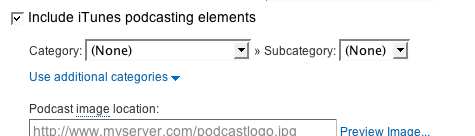
Step 3: Enter Blog address in the "Burn a feed .." form just like below image. If you plan to publish a podcast with your Blogger feed, check "I am a podcaster" box. Then click NEXT>>

Step 4: Now you may see "Identify Feed Source". There you can choose one of feed sytles feeds/posts/default or feeds/posts/default?alt=rss.
Step 5: Fill up a feed title and feed burner address as you prefer. Normally you can choose your blog title. Click NEXT>>

Step 6: Read the information on "Congrats!" . You will find a feed url there. Click NEXT>>

Step 7: If you selected "I am a podcaster" on step 3, configuration options for our SmartCast service will appear. Here you can supply categories and other information for iTunes, append a copyright message, and submit your podcast to Yahoo! Search.

click NEXT>>
Step 8: On the stats configuration page, select the level of feed stats detail you want.

click NEXT>> to finish the process. You're now ready to make your FeedBurner feed available on your Blogger site!

Add Meta Tag for Blogger

What is Meta Tag?

Meta elements are HTML or XHTML elements used to provide information about a Web page or a blog. Meta tags is placed in the head section of an HTML or XHTML document. Meta tag is used to specify the page author, page description, page keyword. Look at the following image. Here the description after title is what i used as meta tag in my blog.

meta

Why is Meta Tag?

Meta Tag is important for Search Engine Optimiziation. It helps Search Engine to index your pages more accurately in their database. It makes blog more popular by increasing more traffic. If you use accurate keyword as meta tag , search engine will try to bring your pages at 1st page. Here is process how to add meta tag in the blog of your blogger.

Steps To Add Meta Tag

Step 1: Login to Blogger.com then go to Dashboard.

Step 2: Go to Layout Tab.

Step 3: Go to Edit HTML tab.

You have to insert the following code.

<meta content='DESCRIPTION HERE' name='keywords'/>
<meta content='KEYWORDS HERE' name='description'/>
<meta content='AUTHOR NAME HERE' name='author'/>

DESCRIPTION HERE: Insert description of your blog or site here.

KEYWORDS HERE: Keywords that describe your blog well.

AUTHOR NAME HERE: Your name or Blogger name.

Step 4: Now find out the following line: <b:include data='blog' name='all-head-content'/>

Step 5: Now insert the meta tag after the above line.

meta tag

You are done. If you still confuse , search for Meta Tag Generator.

Sunday, 9 September 2012

What is Adsense Revenue Sharing Program

Must check this trick for creating Adsense Account Trick to Create an Adsense Account In Few Hours .


What is Adsense Revenue Sharing Program

I have already posted about earning through google (adsense) in which i have completely explained about how to put the google ads on your blog.Now i am going to tell you about another way through which you can earn more using your adsense account.This method is particularly useful for those people who dont have a running blog so couldn't get much through adsense.This method is called Adsense Revenue Sharing program.

Have already heard anything about Revenue Sharing Sites?

Revenue Sharing Sites are sites which place ads (particularly from adsense) of its members throughout its website. The site ads and the member’s ads impressions will be divided according to the site’s rules. Revenue Sharing Sites can be a Social networking, Forum or Article Marketing Website.

Does it violate TOS of Adsense?

As of now, I haven’t found any conflicts of this concept to the TOS of Adsense. If you are worried that this might be an illegal way of earning in adsense then as of now, it is not directly define in any sentences within the TOS of adsense. There are a lot of Revenue Sharing sites that exist for a very long time now. A very popular Revenue Sharing Forum Site is the DP or Digital Points.

DP is doing this concept for how many days and months still, there are no reports from its members of getting suspended by adsense because of joining the site. Getting to Know Revenue Sharing Sites As I have said, this kind of site can be in form of forum, social networking or article submission site. Adsense, as we all know can pay you by the number of page impression who have made with their adsense placing on it. In a forum revenue sharing site, it works based on your activity. If you post messages on discussions or making your own discussions, every time a visitor hits and read that page and your ads is currently in display, you have a great chance on earning from it.

The key on this kind of forum sites is to be active and make discussions that are interesting. For social networking site, it works when someone view your profile. Some other sites would offer a random placing of ads on the top of their every page. For article submission sites, it works when someone view your article. The ads will match to the article that you have made, so the possibility of ads getting click by the reader is very high.

If you are an adsense user and you think that your blog or website traffic is not enough to make a good traffic to earn with your adsense, you may want to try on joining to this Revenue Sharing Sites.

If you have any confusion about adsense revenue sharing program then ask here.

Approve Adsense Account within 2 Days

I have posted in the previous posts about the adsense earning and a lot about how to increase it with adsense revenue programs.Now i am going to tell you about a new trick through which you will get adsense account quite easily.

Adsense has actually stopped accounts in INDIA because of spam.But though this trick you can get adsense account easily.

How To Get Adsense Account?

  • Its Simple
  • Go Here www.indyarocks.com And Register Then On the right Side Click On Google Adsense.
  • Complete Their Requirements And Fill the form, Your Account Will Be approved 3 To 48 Hours.
  • So this Is What You Need Right
  • Do not Make More Then 1 Account With 1 IP/Home address And User Name Because then Your All Accounts Will Be Banned.
    Enjoy :)

I think you guys must Check this too Approve adsense account in just few hours

Approve adsense account in few days

Adsense has become very careful in the approval of account specially in middle east countries like Pakistan ,India etc . Anyways we have found a trick for the adsense approval ...... herez the trick .

For Pakistanis

If u are feeling problem in approving your account then do the following steps during registration on adsense but remember before apply your  blog must have at least 10 topics,just copy paste material from net .....

  • Put your city : quetta
  • Country name : pakistan
  • Address : write any adress
  • Phone no : write any mob no
  • Postal address : 87300
  • Now submit it ... it will be approved just after one or two days . After that sign in and go in personal settings and change all of ur settings i.e adress,phone no etc to originals.

For Indians

No Need to own a web site of six month old. Rule to get Adsense approval:

  • Register your self at Indyarocks.
  • Upload a profile image.
  • Complete your profile.
  • Upload 10 photos in photo album.
  • Write 2 blogs of 100 words
  • Now apply adsense using your Gmail.You will get adsense approved with in 2 days.

I think you guys must check this trick too a more fastest way to get Adsense account in just few Hours .Best of luck guys ..... If this trick works for you , do let me know ..... :))

Trick to Create an Adsense Account In Few Hours

100% adsense approval trick

Google AdSense is widely used platform to generate revenue from blogs or by publishing contents online. Unfortunaley, there are large number of people who are misusing Google AdSense. One of the popular misuse is having more than 1 Google Account and another is selling Google AdSense accounts. Google has a team of smart people, trust me, they will disable your account whenever they audited your account manually. Because of such misuses, Google has stricken their policies and people are facing problems while creating new Google adsense account. Earlier we published an article on how to get AdSense quick approve which works like a charm however here is another trick to Get Adsense account within few hours successfully.<

AdSense Account within Few Hours

Well, there is not any magic involved in this trick. It only depends on selection of right combination of various factors while applying for a Google Adsense account.

  • Create a Yahoo email address (also called Yahoo! ID) with your name such asjohnsmith3445@yahoo.com
  • Signup for Blogger with same Yahoo! Email ID.
  • Create a Blogger Blog on your name i.e. http://johnsmith.blogspot.com. If Yourname is not available then add some additional number to it but must use your full name i.e. http://johnsmith3445.blogspot.com
  • Post just 3 articles about your self such as Your life in High School, How was your Yesterday, Any movie you watched etc. Write your own words instead of copying from Internet.
  • Now, its time to apply for an AdSense account - Go to Monetize tab from your blogger account and apply for an AdSense account.
  • You will get the response from Google Adsense team within few hours.

There is not something illegal or tricky in this method so it does not violates the Google Adsense TOS at all. I wonder what makes Google Adsense team to approve such accounts with highest priority.

Monday, 9 July 2012

Who is a New Bloggers or Web owners

Who is a new blogger or  web owner?

  1. Your Blog or website is just one year old
  2. Your Blog has a PR less than 2
  3. Your Alexa Rank is > 100,000
  4. You receive 100-300 visitors daily
  5. Total number of your posts are less than 60-50

If you fit into this category and you lost your account then you don't have to worry because you honestly have lost nothing! Without 1000-10,000 daily visitors, Adsense or any other Ad service is meaning less. It will take 5-6 months for you to make just $50-100 if you fit in the above category. So what should be the best solution for you?

You still can make your dream come true and earn a happy living online by taking these steps:

  1. Make a new Gmail Account with different First and Second Name and Personal Info.

  2. Setup a New blogger account with the new Gmail ID

  3. Delete your Old Blog and Import your old posts to this new one by making serious Editing. Do not republish those posts with the same titles and starting paragraph and blogger images. Shuffle the paragraphs. The best idea is to rewrite them in different words. I know this will take long but you can do that within a week if your posts are no more than 50.

  4. If your blogger account and Gmail ID is not very old and crowded then the best is to delete both of them and make a new fresh start. Don't worry this step is smart long term one, it will hurt you at first but you will be in a much better state later.

  5. If you want to keep your blogger account and Gmail ID then its better to set up a blog with upgraded Wordpress and not the free one.

  6. Do not Link to your old blog after you have set up the new one.

How am I so sure of these steps? My own home buddy lost his Adsense Account. He receives 16000 daily visitors by sharing security threat articles. He set up a blog on wordPress and now he is receiving 2000-3000 visitors on the new blog with $2-4 per day, which is not a bad startup.